Tie Dye
- 4.5
- Rating
- 100.00M
- Installs
- Free
- Price

 Analysis by App-foxy
I went into Tie Dye expecting a quick color-mixing game, and that is exactly where it fits best: a casual simulation built around creating bright designs rather than winning complicated battles or managing a long strategy campaign. Developed by CrazyLabs LTD, it turns dyeing and decorating into short, touch-friendly tasks. I found it easy to pick up, but the small moments of friction matter more here than they might in a larger game, because the entire experience depends on simple gestures feeling clear and responsive.
The game is free to download and suitable for Everyone, which makes it a reasonable choice for a child, a relaxed afternoon break, or anyone who enjoys visual customization without a demanding learning curve. Its store presence is substantial, with over 100 million installs and an average rating of 4.5 from around 611 thousand ratings. Those numbers suggest that the basic idea has broad appeal, but they do not remove the need to decide whether this particular style of play matches your patience and expectations.
What the dyeing workflow feels like in everyday play
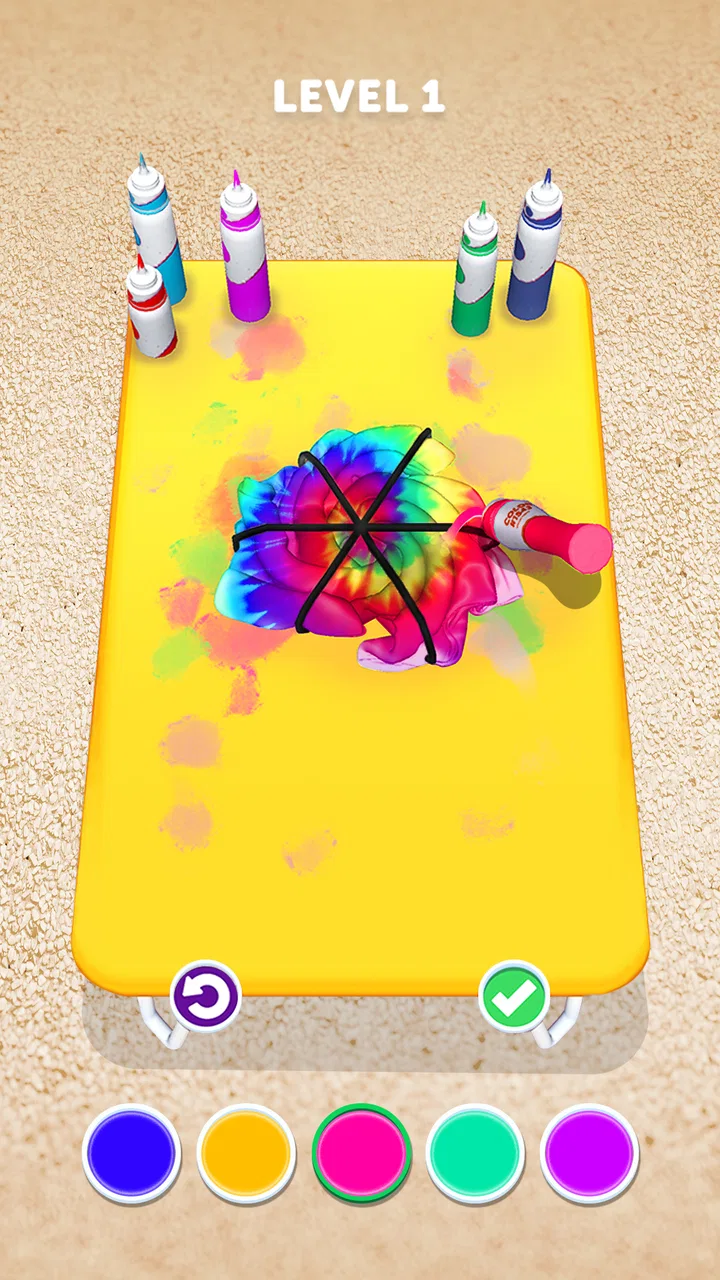
The central appeal is the hands-on routine. I mix colors, apply them to clothing designs, and watch a plain item become something more expressive. That transformation gives each short session a clear beginning and end. It is not trying to be a full fashion-design tool, and I would not approach it expecting precise professional editing. Instead, it works as a playful visual sandbox where the satisfaction comes from seeing a colorful result appear quickly.
You May Also Like

 AccuWeather: Weather Radar
AccuWeather Review: A Quick, Clear Forecast for Everyday Decisions
For everyday plans, the best forecast is the one you can understand quickly. AccuWeather makes rain timing, radar, and local conditions easy to act on, with a few trade-offs.

 Hill Climb Racing
Why Hill Climb Racing Still Turns Crashes Into One More Run
A tiny car, a bumpy hill and one more upgrade: Hill Climb Racing keeps resurfacing because its simple chaos makes every near-miss feel personal.

 AliExpress - Shopping App
AliExpress Makes Global Shopping Feel Personal, but Shoppers Bear the Risk
AliExpress turns a global marketplace into a pocket-sized discovery engine. Its reach is useful, its shopping loop compelling, and its trade-offs easy to miss.

 Lords Mobile: Kingdom Wars
Lords Mobile Is a Kingdom-Building Routine, Not a Quick Match
A case-by-case verdict on the building, battles, device demands, and social commitments that make Lords Mobile rewarding for some players and exhausting for others.

 PDF Scanner app - TapScanner
TapScanner Makes Paperwork Easier to Capture, Check, and Share
TapScanner makes scanning with a phone feel less like a rescue operation and more like a dependable step in getting work done. Its capture tools are useful, though not flawless.

 Block Blast!
 Shows How Much a Puzzle Game Can Leave Out
A quiet grid game shows why puzzle players increasingly value instant clarity, repeatable skill and low-pressure play—and where the genre still needs to catch up.
More From Our News Desk
View All News


That makes it especially suitable for short gaps in the day. I can imagine opening it while waiting for an appointment, handing it to a child during a quiet period, or playing a few rounds before bed without needing to remember a complicated story or a large set of controls. The bright presentation also makes the result easy to understand at a glance. When a design works, the reward is immediate: the item looks more lively than it did a moment earlier.
The trade-off is that the same simplicity can become repetitive. If you want deep simulation, detailed fabric control, realistic color science, or a large creative toolkit, this will feel limited. The game presents dyeing as a sequence of compact challenges, not as an open-ended art application. I enjoyed the speed, but I would choose a dedicated drawing or design app for a project where I needed exact shapes, careful layering, or a result I could refine over a long period.
One useful way to approach it is to treat every design as a small experiment rather than trying to produce a perfect result immediately. I found it more enjoyable to notice how a color choice changed the overall appearance, then adjust my next attempt. This mindset also reduces frustration when a gesture does not land exactly where I intended. The game is better at encouraging quick visual decisions than at supporting painstaking correction.
Where players are most likely to get stuck
The first sticking point is usually not understanding the goal; it is controlling the application of color cleanly. On a small phone screen, a finger can cover the area being decorated, making it difficult to judge the edge of a design while dragging or tapping. I had better results when I slowed down near boundaries and used short movements instead of sweeping across the whole item in one motion.
A second issue is expectation. A player may assume that a color will behave exactly like paint in a real craft project, while the game is designed around simplified interactions. If the result looks different from what you pictured, that does not necessarily mean the device or the game is malfunctioning. It may simply reflect the game’s interpretation of the gesture and the selected color combination.
I also recommend separating visual disappointment from a genuine input problem. If the design changes consistently after a gesture, the game is probably responding as intended, even if the blend is not your favorite. If touches stop registering across several attempts, the situation deserves a different check. This distinction saves time because it prevents repeated restarts when the real issue is only an unexpected artistic outcome.
Another source of friction is playing too quickly. Since the tasks look simple, it is tempting to rush through them, especially after learning the basic controls. That can lead to accidental taps, uneven coverage, or a color being used before you have decided where it belongs. I got more reliable results by pausing briefly between selecting a color and applying it, particularly when the design had several visible sections.
Simple setup checks before blaming the game
Tie Dye supports devices running Android 7.0 or later. Before troubleshooting anything more complicated, I would check the operating system and make sure the game is installed on a device that meets that basic requirement. A phone that is technically old but supported may still struggle if its storage is nearly full or if many other apps are active, so freeing space and closing unused apps is a sensible general first step.
Touch response is central to this game, so the screen itself deserves attention. A dirty or damp display can make short gestures feel inconsistent. I would clean the screen, remove anything that interferes with finger contact, and try again with deliberate movements. If other touch-based apps also respond poorly in the same area, that points toward the device rather than this particular game.
It is also worth checking whether the game has finished installing or updating before starting a session. Interrupting an installation, switching repeatedly between apps, or launching immediately after an update can create temporary instability. My practical routine would be to close the game, reopen it once, and allow the device a moment to settle before judging performance.
Because the game is free, downloading it does not require an upfront purchase. However, it includes in-app purchases ranging from $2.99 to $49.99 per item. That is important if a child uses the device. I would review the device’s purchase controls and make sure the person playing understands that optional paid items can exist, even though the initial download costs nothing. This is a setup decision as much as a financial one.
The current version is 5.4.0.7, so checking whether the installed copy is current can also be useful when a problem appears after a long period away. I would use the normal app-store update process rather than repeatedly deleting and reinstalling the game. Reinstallation is a more disruptive step and should come later, after simpler checks have been tried.
How I recover when a design or session goes wrong
When a color application does not look right, I first stop touching the screen for a moment. Continuing to tap while trying to correct a mistake can add more changes before I understand what happened. If the game offers a way to continue or restart the current activity, I would use the visible in-game option rather than immediately closing the app. That keeps the response proportional to the problem.
If the screen appears frozen, I would wait briefly to see whether the interaction completes, then close and reopen the game if it remains unresponsive. A single restart can clear a temporary issue without disturbing the rest of the device. I would avoid repeatedly forcing the app to close, because that makes it harder to tell whether the problem was a one-time slowdown or a persistent fault.
For inconsistent gestures, changing the way I hold the phone can help. I prefer a stable grip with one hand and a controlled finger movement from the other. A stylus may feel more precise on some screens, but I would not assume that every accessory will improve the experience. The game is designed for ordinary touch input, and a simple, clean finger gesture is often the most predictable approach.
Another practical recovery method is to reduce distractions. Notifications, rapid app switching, and accidental screen touches can interrupt a short activity. I found that playing with the phone resting securely on a table made it easier to keep movements inside the intended area. This is a small change, but it matters in a game where the difference between a successful gesture and an unwanted mark can be only a few millimeters.
If a child is playing, I would explain the goal before handing over the device: choose a color, apply it carefully, and pause if the screen does something unexpected. That simple instruction prevents frantic tapping. It also turns troubleshooting into part of the activity instead of making the game feel broken after one imperfect result.
When the problem may not be Tie Dye
Not every slowdown, missed touch, or crash comes from the game. A device with very little free storage, heavy background activity, or a screen problem can affect many apps at once. I would test another touch-based game or a basic drawing surface. If the same area of the screen fails there too, the evidence points away from Tie Dye.
Battery-saving modes can also change how a phone behaves, especially when the device is already warm or busy. I would let the phone cool down, close demanding background apps, and try again later. This is particularly relevant during longer sessions, even though the game itself is designed for casual play. A short break can be more effective than repeatedly restarting the same activity.
Connection-related frustration should be handled carefully as well. If a screen takes time to load, the network may be involved, but a missed color gesture after the activity is already visible is more likely to be an input or timing issue. I would avoid changing several settings at once. Checking the connection, reopening the game, and testing a short session gives a clearer idea of what is actually happening.
Age and device compatibility are worth keeping in mind. The game is rated Everyone, which supports its family-friendly positioning, but that does not mean every child will enjoy it equally. Younger players may need help with precise gestures and with understanding optional purchases. Older players who want challenge, competition, or detailed creative control may find the experience too light. The rating describes suitability, not depth.
The developer, CrazyLabs LTD, has positioned this as a broad casual game rather than a specialist crafting simulator. That explains why it feels approachable and visually direct. It also explains why a player looking for realistic textile techniques should choose a different resource. I would use this game to explore color ideas and enjoy quick transformations, not to learn how real dye behaves on fabric.
How it compares with other casual simulation choices
Compared with management simulations, Tie Dye asks for less planning and offers faster feedback. There is no need to build a business, balance resources, or maintain a complex schedule. That is its strongest advantage for someone who wants an activity that can be understood within moments. The cost is reduced long-term depth: once the novelty of decorating starts to fade, there may be less reason to return than there would be in a game with evolving systems.
Compared with drawing apps, it provides more structure. I do not begin with a completely empty canvas and wonder what to create. The clothing-focused tasks give me a clear prompt and a visible transformation. That structure is helpful for children or for anyone who enjoys creativity but does not want to invent a project from scratch. A drawing app remains better for freeform artwork, detailed control, and saving a carefully composed illustration.
Compared with other quick makeover games, its appeal comes from the dyeing theme rather than a broad collection of unrelated activities. If color mixing and visual change are what attract you, that focus feels coherent. If you prefer dress-up, decorating rooms, or character customization, another casual title may provide more variety. I would choose this one when the act of applying color is the main attraction, not simply because it belongs to the simulation category.
There is also a difference between creating something for yourself and completing a task for a score or objective. Tie Dye’s pleasure is largely visual and immediate. Players who need strong progression, competitive rankings, or a narrative reason to keep playing may find the loop too modest. Players who enjoy low-pressure experimentation may appreciate that it does not demand the same commitment as a larger simulation game.
Who should install it, and who should skip it
I would recommend it to casual players who like colorful results, short sessions, and simple touch interactions. It is a good fit for someone who wants a game that can be explained quickly, and its Everyone rating makes it appropriate to consider for family use. The large install base and strong average rating also show that the concept has connected with many players, although personal taste still matters more than popularity.
I would be more cautious about recommending it to anyone who dislikes repetition or expects a realistic craft simulator. The game simplifies the process so that the focus stays on quick interaction. That makes it accessible, but it also means the experience may feel shallow if you want exact fabric patterns, advanced color theory, or a long-term project.
I would also skip it if you are specifically looking for a completely free experience with no purchase considerations. The download is free, but optional items can cost from $2.99 up to $49.99 each. That does not make the game unsuitable, but it does make purchase controls and supervision important, especially on a shared family device.
For a realistic everyday scenario, imagine a parent needing a quiet activity while preparing dinner. The child can work through a colorful design without learning a complicated control scheme, while the parent can first check the device’s purchase settings and explain that tapping a colorful option does not automatically mean it is free. In that situation, the game’s simplicity is useful, but the adult’s setup still matters.
My practical verdict after using it
Tie Dye works because it keeps its promise focused: it gives me a quick way to mix visual ideas and decorate clothing through simple touch play. I like the immediate feedback and the low barrier to entry. The best sessions are short, relaxed, and experimental, with enough attention paid to screen control that accidental gestures do not dominate the experience.
Its weaknesses are equally clear. The interaction can feel imprecise on a small or unreliable screen, the creative depth is limited compared with a drawing tool, and repetition may reduce its appeal for experienced players. The in-app purchase range also deserves a deliberate check before a child uses it. None of these points ruins the game, but they define the audience it serves well.
With a release date of Jul 7, 2020, and a current version of 5.4.0.7, it has had time to become a familiar casual option rather than a brand-new experiment. I would install it when I wanted a bright, uncomplicated simulation for brief breaks, and I would keep a drawing app or a deeper management game available for more demanding creative or strategic needs.
My recommendation is simple: choose it for quick color-focused fun, use careful touch movements, and check purchase controls before sharing the device. If that balance sounds right, this is an easy game to try. If you need precision, realism, or substantial progression, its lightweight design will probably feel more limiting than relaxing.
FAQs for Tie Dye
01What is Tie Dye and how does it work?
Tie Dye is a creative simulation app that allows users to design and create vibrant tie-dye patterns on virtual clothing items. Users can select garments, choose colors, and apply patterns using various tools within the app. The process mimics real-life tie-dye techniques, providing a fun and engaging experience for all ages.
02Is Tie Dye suitable for all ages?
Yes, Tie Dye is designed to be user-friendly and enjoyable for a wide range of ages. While it’s engaging for children and teens who enjoy creative activities, adults can also find it relaxing and entertaining. The intuitive interface ensures that users of all ages can easily navigate and enjoy the app.
03Does Tie Dye require an internet connection to function?
Tie Dye can be used without an internet connection for most of its features. However, some aspects, such as accessing new patterns or sharing your creations on social media, may require connectivity. It's best to have occasional internet access to fully enjoy all the app's features.
04Are there in-app purchases in Tie Dye?
Yes, Tie Dye offers in-app purchases. While the app is free to download and play, users can purchase additional colors, patterns, and tools to enhance their creative experience. These purchases are optional and designed to provide more customization options for enthusiasts who want to expand their design capabilities.
05How can I share my designs created in Tie Dye?
Tie Dye allows users to easily share their creations with friends and family through social media platforms or messaging apps. Once a design is completed, users can use the share button within the app to post their artwork directly to their chosen platform, showcasing their creativity to a wider audience.
Pros
- Intuitive and easy-to-use interface.
- Wide variety of colors and patterns.
- Creative freedom for unique designs.
- Relaxing and stress-relieving gameplay.
- Regular updates with new features.
Cons
- Limited design options in free version.
- Occasional in-app ads can be intrusive.
- Requires internet for some features.
- Graphics can appear pixelated on some devices.
- No multiplayer or social sharing features.

Tie Dye
Gallery